As you connect multiple devices to your home network, you’re potentially opening doors to cyber threats. Installing a VPN directly on your router can secure your entire network, protecting all connected devices simultaneously.
Imagine having a secure, encrypted internet connection for every device in your home, without the need for individual VPN apps. This setup not only enhances security and protection but also allows you to bypass geo-restrictions while maintaining privacy.
By setting up a VPN on your router, you create a network-wide encrypted tunnel, safeguarding your data from potential threats. In this article, we’ll guide you through the process of securing your home network with a VPN on your router.
What is a VPN Router and How Does It Work?
To understand the power of a VPN router, you need to know how it differs from a standard router. A VPN router is essentially a normal router with a virtual private network (VPN) installed inside it. This setup allows it to manage VPN connections and enable various devices in the home to connect to the VPN service.
Understanding VPN Router Technology
The technology behind a VPN router is rooted in its firmware, which enables it to handle VPN protocols and manage encrypted connections. The best VPN routers come equipped with sufficient random access memory (RAM) to efficiently manage their workloads.
This allows you to connect your local-area network (LAN) to your preferred VPN service or set up a site-to-site VPN
How VPN Encryption Protects Your Entire Network
When internet traffic passes through a VPN router, it undergoes an encryption process that secures your data packets before they leave your network. This means that all devices connected to the router are protected simultaneously.
By establishing a secure tunnel with a VPN server, a VPN router prevents ISPs, hackers, and other third parties from monitoring your online activities or accessing your personal information. As a result, you get a secure and anonymous browsing experience across all your devices.
Benefits of Setting Up a VPN on Router
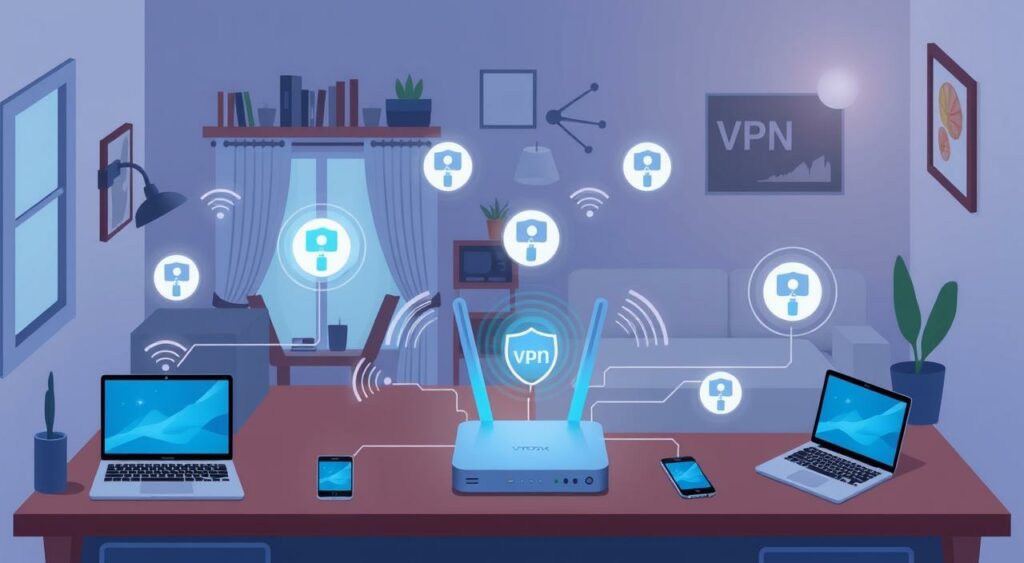
By configuring a VPN on your router, you can protect all your devices with a single setup. This approach ensures that every device connected to your network is safeguarded against online threats.
Protect All Connected Devices Simultaneously
A VPN router allows you to secure all devices connected to it, including computers, smartphones, smart TVs, and gaming consoles, without the need for individual VPN installations. This is particularly useful for households with multiple devices.
Secure Smart Home Devices Without Native VPN Support
Many smart home devices, such as streaming devices and smart speakers, do not support native VPN applications. A VPN router solves this compatibility issue by providing a secure connection for these devices, ensuring they are protected from potential threats.
Always-On Protection Without Multiple Installations
With a VPN router, you only need to enter your login credentials once. This means that all connected devices can enjoy a secure browsing experience without the hassle of reconnecting each time you go online.
Potential Drawbacks to Consider
While setting up a VPN on your router offers numerous benefits, there are several drawbacks to consider before making the switch. Understanding these limitations will help you make an informed decision about whether a VPN router is right for you.
Impact on Internet Speed
One of the primary concerns with using a VPN router is the potential impact on your internet speed. As you connect multiple devices to the router, the VPN encryption process can cause a decrease in overall network performance.
The more devices connected, the slower the speed each device receives. You may need to prioritize which devices can connect at one time to maintain optimal performance.
Technical Setup Challenges
Setting up a VPN on your router can be technically challenging. You may encounter firmware compatibility issues or struggle with complex configuration settings. Ensuring that your router is compatible with VPN software and configuring it correctly can be time-consuming and may require some technical expertise.
Limited Server Switching Flexibility
With a VPN router, you are generally limited to using the server you initially set up. If you want to switch to a different server, you’ll need to reconfigure your router’s settings.
This can be inconvenient, especially if you need to switch servers frequently. In contrast, device-level VPN apps often allow for quicker and easier server switching.
Router Compatibility for VPN on Router
When setting up a VPN on your router, compatibility is key to ensuring a seamless and secure connection. You have several options to consider when it comes to choosing a VPN-compatible router.
Types of VPN-Compatible Routers
There are various types of VPN-compatible routers available, ranging from consumer-grade models to specialized VPN routers with pre-installed firmware. You can opt for a pre-configured VPN router, which comes with the VPN software already installed, or choose a standard router that requires manual VPN setup.
Pre-Configured vs. Manual Setup Options
Pre-configured VPN routers offer convenience, as they are already flashed with the necessary software. However, they come with a higher price tag. On the other hand, you can upgrade your existing router by flashing it with custom firmware, such as DD-WRT, Tomato, or OpenWRT, which can add VPN capabilities.
Popular Router Models That Support VPN
Some popular router models that support VPN include ASUS, Linksys, and Netgear options. When selecting a router, look for key specifications such as processor speed, RAM, and firmware compatibility to ensure smooth VPN performance.
You can determine if your existing router can be upgraded to support VPN functionality through firmware updates. Checking the router’s specifications and compatibility with your VPN provider is essential.
Step-by-Step Guide to Setting Up a VPN on Your Router
Setting up a VPN on your router is a straightforward process that enhances your network’s security. This guide will walk you through the necessary steps to configure a VPN on your router, ensuring all your connected devices are protected.
Preparing Your Router for VPN Installation
Before you begin, ensure your router is compatible with VPN services. Check the firmware version and update it if necessary. Backing up your current settings is also recommended to avoid any configuration loss during the setup process.
Accessing Your Router’s Admin Panel
To configure your VPN, you need to access your router’s admin panel. This is typically done by entering the router’s IP address or URL into a web browser. Common addresses include http://192.168.0.1 or http://www.asusrouter.com. Log in with your admin credentials to proceed.
Configuring OpenVPN Settings
Navigate to the VPN section in your router’s admin panel and select the OpenVPN option. You’ll need to enter the VPN server address, authentication details, and encryption settings provided by your VPN service. Save your settings to apply the changes.
| Setting | Description | Example Value |
|---|---|---|
| VPN Server Address | The address of the VPN server | us-nyc.vpnprovider.com |
| Authentication | Username and Password for VPN | Your VPN Credentials |
| Encryption | Encryption protocol used | AES-256-CBC |
Verifying Your VPN Connection
After configuring OpenVPN, verify that your connection is working correctly. Check your IP address to ensure it’s been changed to the VPN server’s IP. You can also test for DNS leaks to confirm your VPN is properly configured.
By following these steps, you can successfully set up a VPN on your router, securing all your connected devices with a single configuration.
Maximizing Your Router VPN Experience
Enhance your VPN experience by strategically selecting VPN servers. To achieve optimal speed, connect to a VPN server closest to your location. The more servers your VPN provider offers, the greater your options for finding a fast and reliable connection.
When configuring your VPN on the router, be mindful of potential pitfalls. Avoid doubling up on VPN connections by running a VPN on both your router and device, as this can significantly decrease your internet speed. Instead, rely on your VPN-protected router to secure all connected devices.
To ensure you’re getting the most out of your VPN service, look for the latest encryption standards such as WireGuard, IKEv2, and OpenVPN. Not all VPN routers support these protocols, so it’s crucial to check compatibility. Additionally, be cautious of free VPN services that may compromise on security and performance.
For easy access to your VPN router settings, bookmark the router’s IP address on your browser. This simple step can save you time when you need to adjust settings or monitor your VPN connection. By following these best practices, you can maximize your router VPN experience and enjoy a secure, fast, and reliable internet connection for all your devices at home.
FAQ
What is the primary benefit of setting up a VPN on my router?
By configuring a VPN on your router, you can protect all connected devices simultaneously, including those that don’t natively support VPN software, such as smart home devices.
Will setting up a VPN on my router slow down my internet connection?
Yes, using a VPN can impact your internet speed due to the encryption process. However, the extent of the slowdown depends on various factors, including your internet service provider, VPN provider, and the distance to the VPN server.
Can I use any router with a VPN?
Not all routers are compatible with VPNs. You need a router that supports VPN configuration, either through manual setup or pre-configured options. Popular router models like those from Netgear, Asus, and Linksys often support VPN.
How do I access my router’s admin panel to configure VPN settings?
To access your router’s admin panel, open a web browser and navigate to the router’s IP address (usually 192.168.0.1 or 192.168.1.1). Log in with the admin username and password, which can be found in the router’s documentation or on the manufacturer’s website.
What is OpenVPN, and why is it used for VPN configuration on routers?
OpenVPN is an open-source VPN protocol that provides secure and reliable connections. It’s commonly used for VPN configuration on routers due to its robust encryption and flexibility.
Can I switch VPN servers easily after setting up a VPN on my router?
The ease of switching VPN servers depends on your router’s configuration and VPN provider. Some routers and VPN services offer easy server switching, while others may require manual reconfiguration.
Do I need to configure VPN settings on each device connected to my router?
No, once you’ve set up a VPN on your router, all devices connected to it will use the VPN connection, eliminating the need for individual device configuration.